
CHAPTER 01 / FOUNDATION
Two boxes, one job
Discover what stays, what computes, and why the split matters.
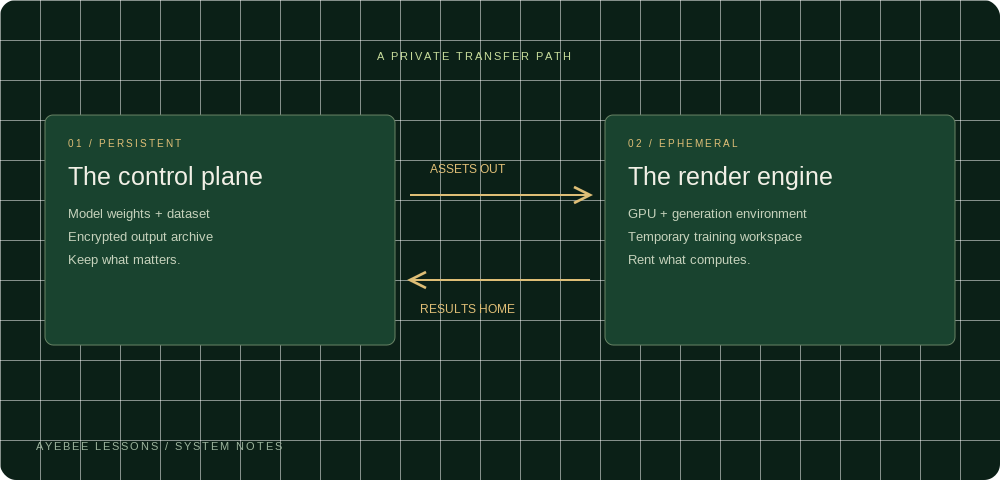
An image-generation system needs somewhere to keep files and somewhere to do the calculation. In this example, a VPS (a rented virtual computer) keeps reusable models, training examples and an encrypted archive. A separate rented GPU does the demanding generation work.
The GPU workspace is temporary. Send it a compatible set of files for the task, then bring useful images, videos and trained adapters back to durable storage before ending the rental. An encrypted connection protects the transfer; it does not hide files from the machine using them.
This two-place design is one option, not a requirement for all image generation. A suitable local computer or managed service can combine these roles. The transferable idea is to distinguish file lifetime from compute lifetime. Persistent storage also needs a separate, tested backup.
 Open full-size diagram ↗
Terms in this chapter’s diagram: VPS · GPU · persistent · ephemeral · artifact
Keep the library. Rent the workshop. Back up the work you cannot replace.
Source: MediaGenBox VPS Bible v1.0 · §1 Architecture. Generalised educational adaptation.
CHAPTER 02 / FOUNDATION
Permission before power
Separate observation, approval, execution and independent verification.
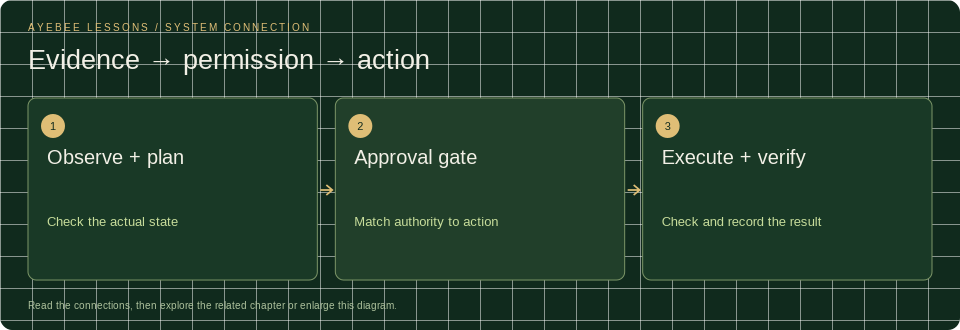
Use a clear sequence for consequential work: inspect the current situation, make a plan, obtain the applicable permission, execute, verify the result and record what happened. A plan describes what you intend; evidence shows what actually happened.
Permission must match the resource and action. If an unexpected disk or instance appears, pause the affected action and check the plan with the responsible operator. Reading a status, deleting a file and destroying a rental have different consequences.
Keep reusable instructions separate from the record of what is running now. Check live provider evidence before acting on an instance. The controls in ImaGen are simulations: clicking them changes your learning progress, not real infrastructure.
 Open full-size diagram ↗
Terms in this chapter’s diagram: API · credential · preflight
Before an action, match the plan, permission and actual resource.
Source: MediaGenBox VPS Bible v1.0 · §2 Governance at a glance. Generalised educational adaptation.
CHAPTER 03 / FOUNDATION
The vault has two states
Understand encryption at rest and the difference between mounted and closed.
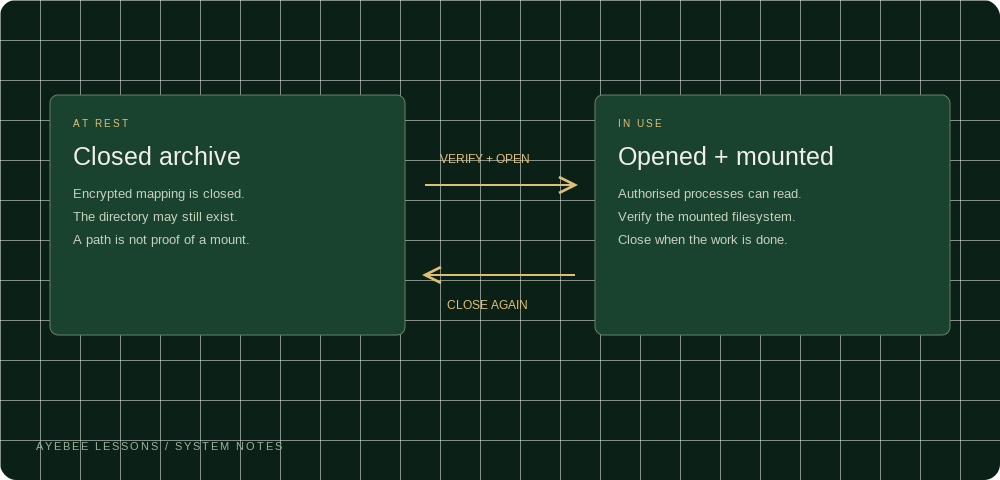
An encrypted archive protects stored files when it is locked. In this example, opening a LUKS2 encrypted mapping and mounting its filesystem makes those files available at a folder path. While open, permitted processes can read them.
A folder can exist even when the archive is not mounted. Before copying into it, check which filesystem actually backs that path. Otherwise a successful copy can land on an ordinary disk outside the intended encrypted archive.
After transfer, compare file integrity and open representative results before removing remote originals. When work is complete, finish writes, unmount the filesystem and close the encrypted mapping. Encryption protects confidentiality; a separately stored backup protects against loss.
 Open full-size diagram ↗
Terms in this chapter’s diagram: LUKS2 · mount · filesystem · encryption
Check the destination filesystem, not just the folder name.
Source: MediaGenBox VPS Bible v1.0 · §3 SOP 1; §12 SOP 10. Generalised educational adaptation.
CHAPTER 04 / FOUNDATION
Download once. Reuse often.
Distinguish repository pages, file delivery, retries and session-sized transfers.
A model cache is a reusable collection of downloaded files. For this latent-image workflow, the generation model creates an internal representation, the text encoder represents the prompt, the VAE decodes the result into pixels, and an optional compatible adapter specialises behaviour.
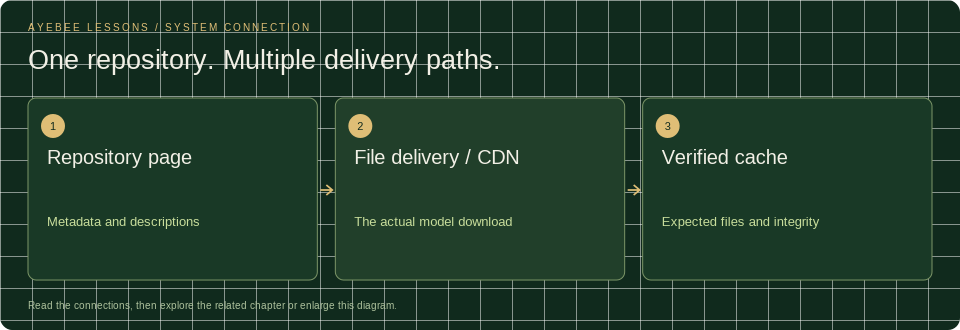
A model’s information page and its large files can arrive through different servers. If the page opens but a download stalls, inspect the actual file-delivery path, access requirements and downloader logs. A failed transfer is not evidence that you need a faster GPU.
Check free disk space, the expected file list and published sizes or trusted hashes. A checksum match can show that a copy matches the expected file; it does not establish model quality or replace checking the source and licence. Keep a manifest so the next session uses the same verified components.
 Open full-size diagram ↗
Terms in this chapter’s diagram: CDN · model weights · cache · checksum
Reuse verified files. Diagnose the path that actually failed.
Source: MediaGenBox VPS Bible v1.0 · §4 SOP 2; §13 Hugging Face downloads. Generalised educational adaptation.
CHAPTER 05 / SESSION
Rent the right engine
Balance compatibility, available credit, disk needs and rental lifetime.
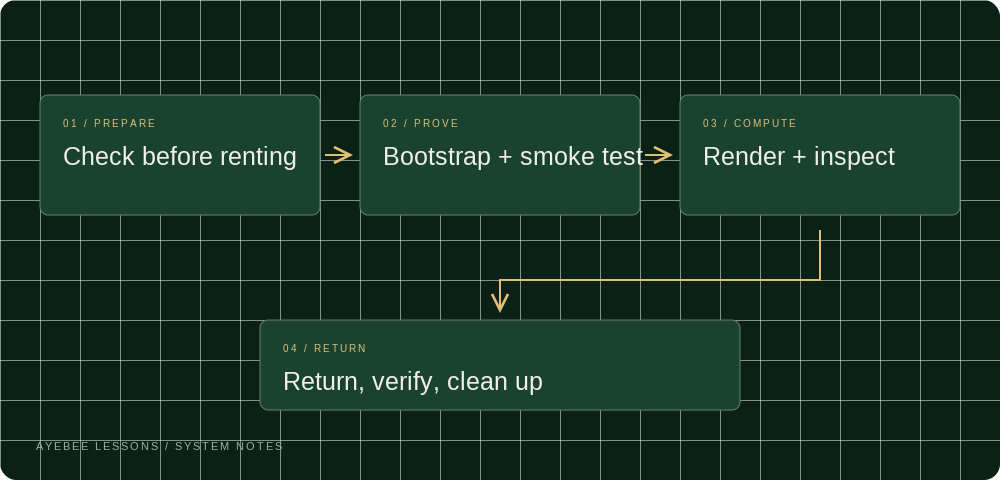
Choose compute for the actual workflow: model size, working memory, software support, output resolution and speed all matter. GPU VRAM, system RAM and disk storage are different resources. A large disk cannot compensate for insufficient GPU memory.
Before renting, verify the exact GPU, compatible driver and software image, disk allocation, account funding and access method. There is no universal minimum GPU or disk size for image generation. Published offers and prices can change; use the provider’s current information.
Budget setup, transfer, generation and verification time as well as retained storage and any transfer fees. On Vast.ai, stopped instances can still incur storage charges. The budget puzzle uses invented rates to teach arithmetic; check real billing rules and independent volume charges before closing a session.
 Open full-size diagram ↗
Terms in this chapter’s diagram: GPU · VRAM · preflight · lifecycle
Budget the whole session, including resources retained after compute stops.
Source: MediaGenBox VPS Bible v1.0 · §5 SOP 3; §13 Vast.ai. Generalised educational adaptation.
CHAPTER 06 / SESSION
Compatibility is a moving target
Catch a working GPU environment that breaks after a node installation.
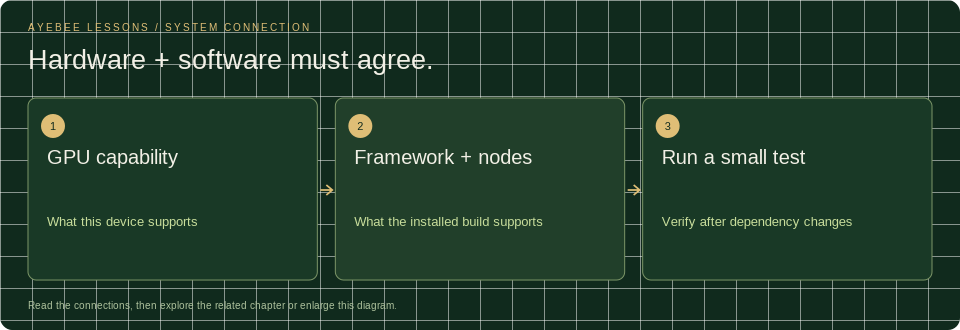
A GPU needs compatible software to run a model. Check the actual device, driver, framework build and required operations together. An installation completing successfully does not prove that GPU execution works.
Extensions can install dependencies that replace a working package. Save the known-good versions and run a small representative GPU test before and after changes. Separate generation and training environments when their requirements conflict.
Choose network access deliberately. A loopback-only ComfyUI service reached through an SSH tunnel differs from a service bound to a private network. Check bindings and access controls for the chosen design; opening a public port does not fix a software compatibility failure.
 Open full-size diagram ↗
Terms in this chapter’s diagram: CUDA · PyTorch · sm_120 · dependency · custom node
After changing dependencies, repeat a real GPU test.
Source: MediaGenBox VPS Bible v1.0 · §6 SOP 4; §13 GPU bootstrap. Generalised educational adaptation.
CHAPTER 07 / SESSION
Pack for this session
Choose a slim asset set and protect the return journey.
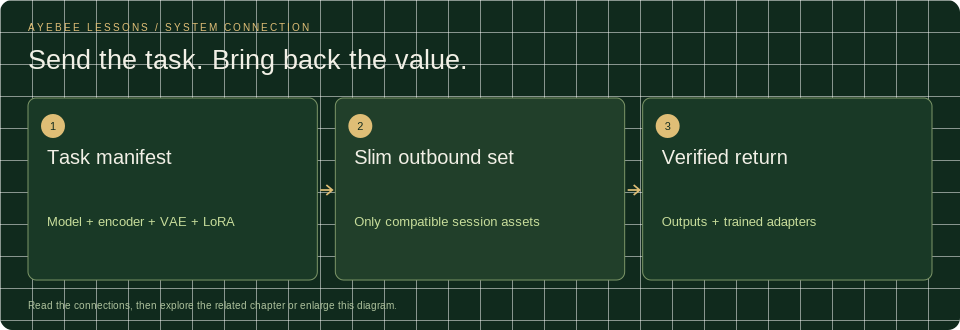
Pack the compatible components used by the selected workflow. In this exercise, a still-image session needs a generation model, text encoders, a VAE and an identity adapter. Other workflows may bundle components or omit the adapter; follow their actual requirements.
Transfer only what the task needs and verify the received files. Private networking and SSH protect the connection path, but the rented computer still handles the files in use. Keep credentials and sensitive source material out of unnecessary transfers.
Plan the return trip before starting. Confirm the durable destination is mounted, copy valuable outputs and adapters, verify integrity, and open representative files. Treat deletion as a separate deliberate step so a mistaken destination does not remove the only useful copy.
 Open full-size diagram ↗
Terms in this chapter’s diagram: manifest · text encoder · VAE · LoRA · rsync
Pack for the task. Verify the return before deleting the original.
Source: MediaGenBox VPS Bible v1.0 · §7 SOP 5. Generalised educational adaptation.
CHAPTER 08 / SESSION
Prove the chain first
Use a small test to avoid scaling a broken identity or workflow.
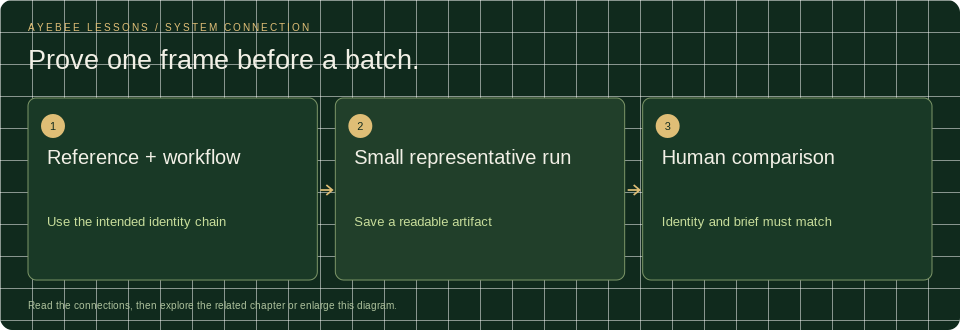
A smoke test is one small run that exercises the important parts of your intended workflow. Use the actual model, adapter and settings you plan to scale. Save a representative result you can open and inspect.
Check distinct requirements separately: does the file open, is the image structurally plausible, does the intended subject match the reference, and does it meet the brief? A successful request or queue entry does not answer those questions.
If the same identity error recurs, inspect the chosen adapter, reference, training examples, captions and workflow before making a large batch. One passing test reduces uncertainty; it does not guarantee every later output. Continue sampling results during production.
 Open full-size diagram ↗
Terms in this chapter’s diagram: canonical reference · workflow · smoke test · batch
Prove one representative result, then keep checking as you scale.
Source: MediaGenBox VPS Bible v1.0 · §8 SOP 6. Generalised educational adaptation.
CHAPTER 09 / SESSION
Teach what stays the same
Separate identity invariants from clothing, pose and setting.
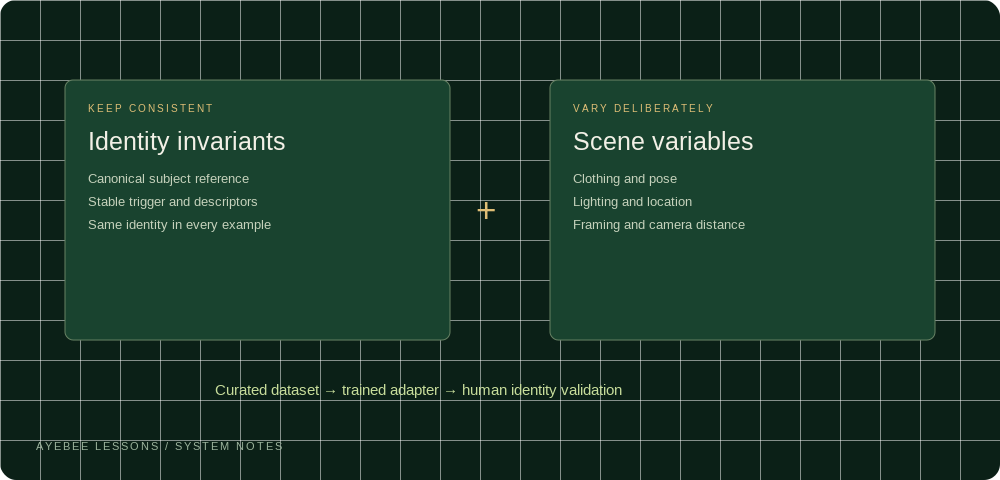
An identity adapter learns patterns from examples. Curate a consistent intended subject while varying clothing, framing, lighting, pose and setting. If every example uses one outfit, the adapter may learn that outfit as part of the subject.
In this exercise’s caption strategy, keep the subject trigger consistent and describe changing scene details accurately. Caption conventions, useful dataset size and training settings depend on the base model and toolkit. Treat this strategy as a worked example to validate, not a universal recipe.
Evaluate the adapter on prompts and situations beyond its training examples. Look for identity drift and unwanted repetition of outfits or backgrounds. Save the adapter and its model version, settings and validation notes to durable storage. Use images you have appropriate rights and consent to use.
 Open full-size diagram ↗
Terms in this chapter’s diagram: dataset · caption · invariant · trigger · LoRA
Keep the subject consistent. Vary the scene. Test beyond the training examples.
Source: MediaGenBox VPS Bible v1.0 · §9 SOP 7; §13 LoRA training. Generalised educational adaptation.
CHAPTER 10 / SESSION
From still to motion
Understand graph outputs, model residency and the frame-rate trap.
Stills and video use different workflows and compatible model sets. An image-to-video workflow uses a starting image plus instructions for motion; a still-image adapter is not automatically compatible with its video model.
A graph can produce an intermediate object without saving a usable file. Include an appropriate save or export step, then open the encoded result. Record the workflow, model versions and key settings alongside useful outputs so you can investigate differences later.
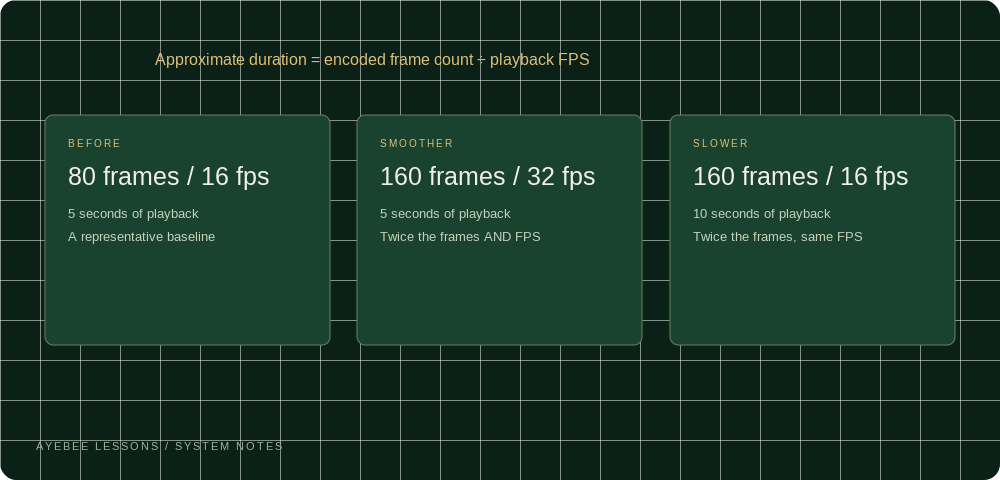
For a constant-frame-rate clip, duration is approximately encoded frames divided by playback frames per second. Interpolating 80 frames to 160 and exporting at 32 fps keeps a 5-second duration. Exporting those 160 frames at 16 fps gives 10 seconds and slower playback. Interpolation can improve smoothness but can also introduce artifacts; inspect the file and its timing.
 Open full-size diagram ↗
Terms in this chapter’s diagram: FPS · frame rate · interpolation
Count frames and check playback speed. Then inspect the saved video.
Source: MediaGenBox VPS Bible v1.0 · §10 SOP 8; §13 ComfyUI. Generalised educational adaptation.
CHAPTER 11 / VERIFICATION
Three checks for a better result
Separate structural quality, identity matching and brief compliance.
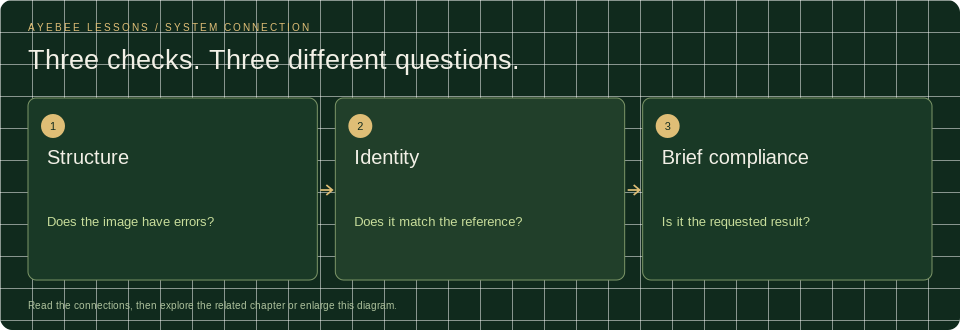
Review three things separately: structural quality, the intended identity and compliance with the brief. Sharpness or plausible anatomy alone does not prove that the subject, pose, clothing or setting is correct.
Automated image descriptions and quality checks can miss defects or invent details. Compare their claims with the actual output and the reference. Record a disagreement honestly: the checker passed, but direct review found a visible problem.
Use a tool suited to the question. A text encoder represents words; a vision-language model can describe an image. Sharing a model-family name does not make them interchangeable. Combine automated screening with direct inspection, and repeat checks across a batch rather than accepting it from one result.
 Open full-size diagram ↗
Terms in this chapter’s diagram: QC · VLM · false negative · canonical reference
A checker’s clean report is one piece of evidence, not a guarantee.
Source: MediaGenBox VPS Bible v1.0 · §11 SOP 9; §13 Delivery. Generalised educational adaptation.
CHAPTER 12 / VERIFICATION
Done means verified
Bring useful artifacts home, clean up and verify the rental lifecycle.
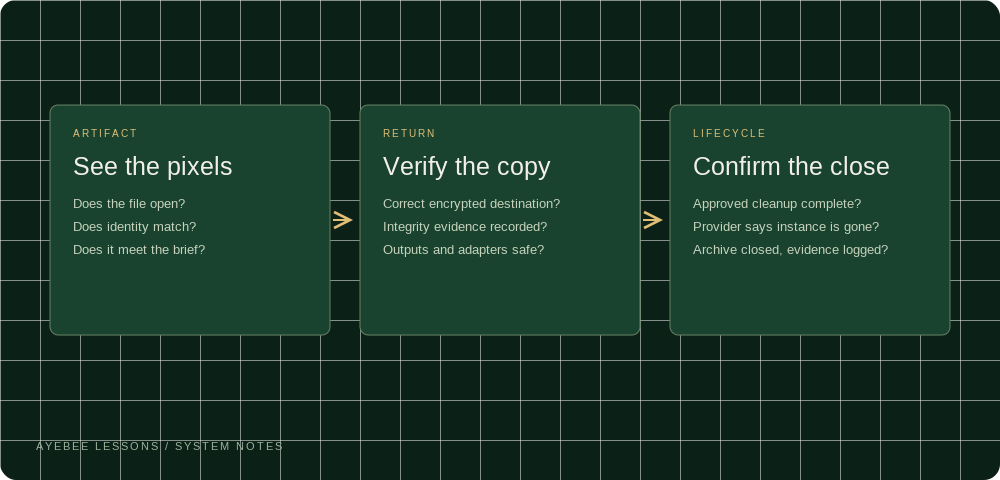
A session ends after the valuable work has a verified durable home. Include generated files, trained adapters and the workflow or settings needed to understand them. A request ID or preview is not a substitute for the actual saved output.
Before destructive cleanup, confirm the destination, compare integrity and open representative received files. Keep a separate backup for irreplaceable work. Deleting files on a rented machine does not establish secure physical erasure.
After approved cleanup and destruction, verify the provider’s instance state and any separately retained storage or billing resources. An SSH timeout could be a network failure, so it cannot prove destruction. Finish writes, close the archive when no longer needed and record what was kept and what was removed.
 Open full-size diagram ↗
Terms in this chapter’s diagram: artifact · checksum · teardown · API · lifecycle
Copy, verify, then clean up. Confirm the provider’s actual state.
Source: MediaGenBox VPS Bible v1.0 · §12 SOP 10; §13 Vast.ai. Generalised educational adaptation.
THE RETURN IS ONLY THE BEGINNING
Now, make it click.
Take these ideas into the stage campaign. Try the simulations and check your reasoning without running a real command or renting a GPU.
Explore the stages ↗KEEP LEARNING / PRIMARY SOURCES
Check the tools behind the ideas.
Concepts reviewed 25 October 2026. This course adapts a particular infrastructure design; current tool documentation governs real setups. ImaGen is an AyeBee Lessons project.
- Hugging Face: text-to-image pipeline components ↗ — see how models, encoders and a VAE work together.
- ComfyUI: Save Image ↗ — distinguish a workflow result from a saved file.
- Vast.ai: rental and storage FAQ ↗ — check current lifecycle and billing rules.